Callouts in Salesforce
A callout is Salesforce's name for sending an HTTP request out to an external system — a payment gateway, an ERP, a shipping API, anything reachable over the internet — and getting a response back. It's the same request/response mechanics from the previous lesson, just with a specific name for "Salesforce is the one making the call."
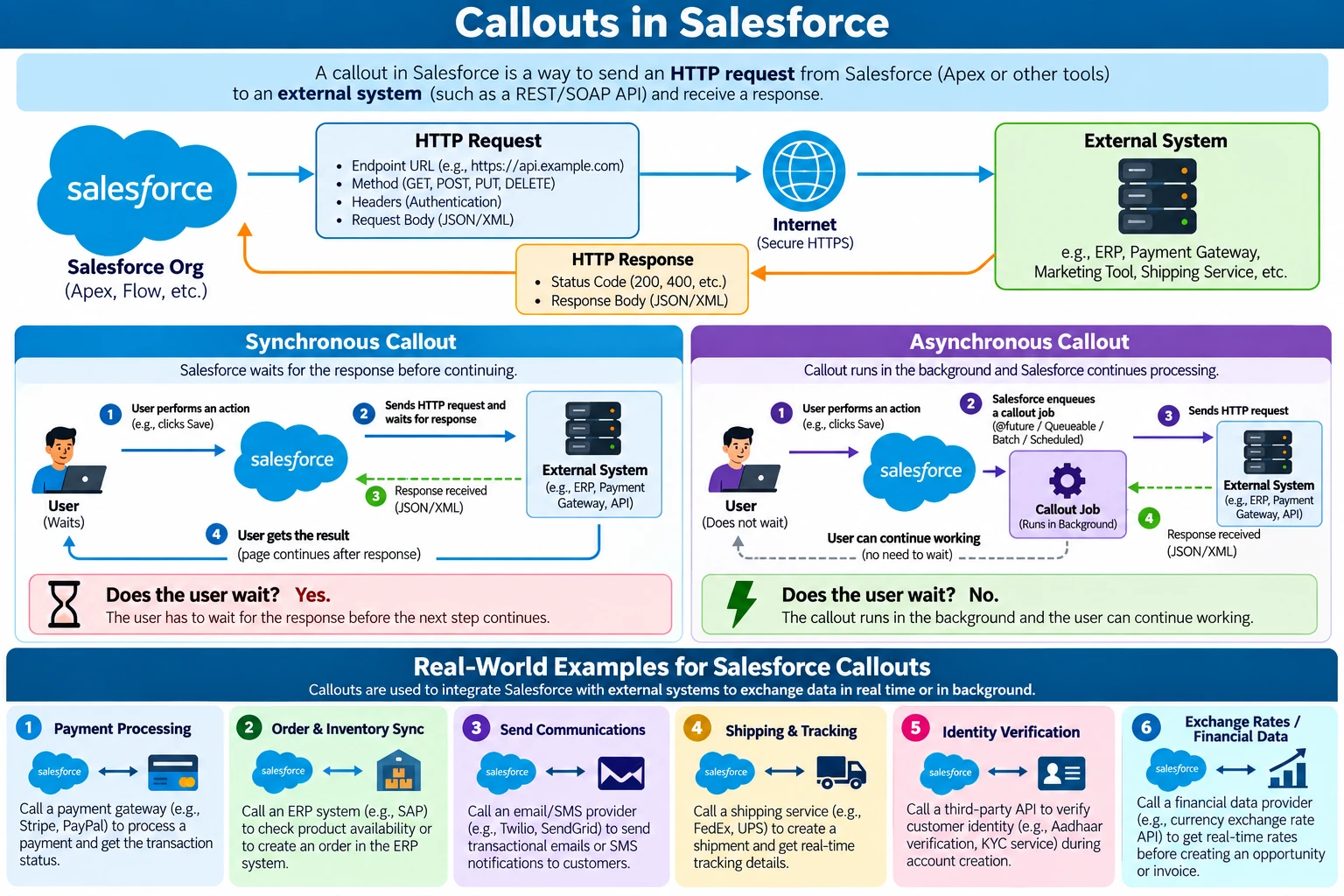
At a high level, every callout carries the same two things covered in the request/ response lesson — a request (endpoint, method, headers, body) going out, and a response (status code, headers, body) coming back. What changes from callout to callout is who's waiting for that response, and for how long.
Synchronous vs asynchronous callouts
This is the first real fork in the road once you start building callouts: should Salesforce wait for the response before doing anything else, or should it hand the work off and keep going?
- Synchronous — Salesforce sends the request and blocks, doing nothing else, until the response arrives (or it times out). The user waits too. Good when you genuinely need the answer right now — validating a value, fetching a live exchange rate, checking stock before letting someone place an order.
- Asynchronous — Salesforce hands the callout to a background job (
@future, Queueable, Batch, or Scheduled Apex) and immediately continues, without waiting. The user isn't blocked. Good for anything long-running, high-volume, or where nobody is sitting there waiting for an instant answer — nightly syncs, bulk data loads, sending a batch of notifications.
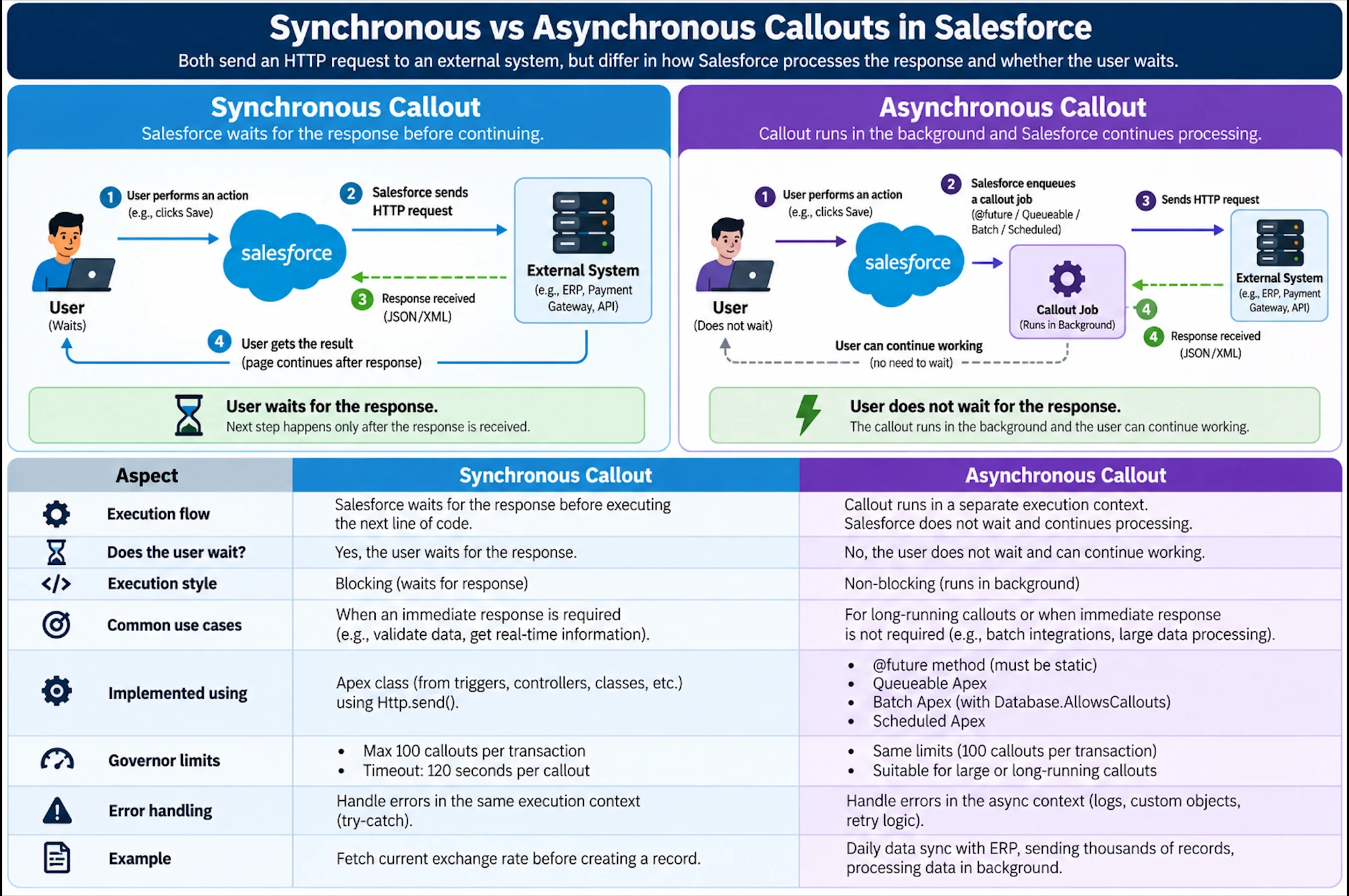
| Aspect | Synchronous | Asynchronous |
|---|---|---|
| Execution | Blocking — waits for the response before the next line runs | Non-blocking — runs in a separate background transaction |
| Does the user wait? | Yes | No |
| Implemented using | Apex Http.send(), called directly from a trigger/controller/class | @future(callout=true), Queueable Apex, Batch Apex (Database.AllowsCallouts), Scheduled Apex |
| Governor limits | 100 callouts / 120s combined timeout — per transaction | Same limits, but scoped to the background transaction instead |
| Typical use | Real-time validation, fetching data needed immediately | Bulk syncs, long-running jobs, fire-and-forget notifications |
Notice the governor limits are the same numbers either way — async doesn't give you more callouts, it just moves the waiting off the user's transaction and into a background one. See Async Apex and Governor Limits for the full breakdown of those limits and how Queueable, Batch, and Scheduled Apex differ from each other.
Where callouts show up in practice
Some of the most common reasons teams build callouts at all:
- Payment processing — charging a card through a payment gateway and reading back the transaction status.
- Order and inventory sync — checking stock or creating orders in an ERP system.
- Sending communications — handing an email or SMS off to a dedicated provider.
- Shipping and tracking — creating a shipment and pulling real-time tracking details from a carrier.
- Identity verification — confirming identity details against a third-party verification service.
- Exchange rates and financial data — pulling a live rate before creating a record that depends on it.
Common mistakes
- Defaulting to synchronous out of habit. If nothing is waiting on screen for the result, a synchronous callout just ties up a transaction (and a governor-limit budget) for no reason — asynchronous is usually the better default for background work.
- Assuming async means "more callouts allowed." The same 100-callout, 120-second-combined limits apply — async just moves them to a background transaction, it doesn't raise the ceiling.
- Calling out synchronously from a trigger. This isn't allowed — a trigger runs
inside a transaction with pending DML, so a synchronous callout from it throws at
runtime. Hand it off to
@future(callout=true)or Queueable instead (covered in Outbound Callouts). - Picking async for something that genuinely needs an immediate answer. If a user is waiting on screen for "is this card valid?", asynchronous just means they see a blank result and have to come back later — that's a synchronous use case.
Learn more on Trailhead
Apex Integration Services covers the callout mechanics in Apex, and Asynchronous Apex covers the background-job side (Future, Queueable, Batch, Scheduled).
Quiz
Check your understanding
Question 1 of 5What is a callout, in Salesforce terms?